

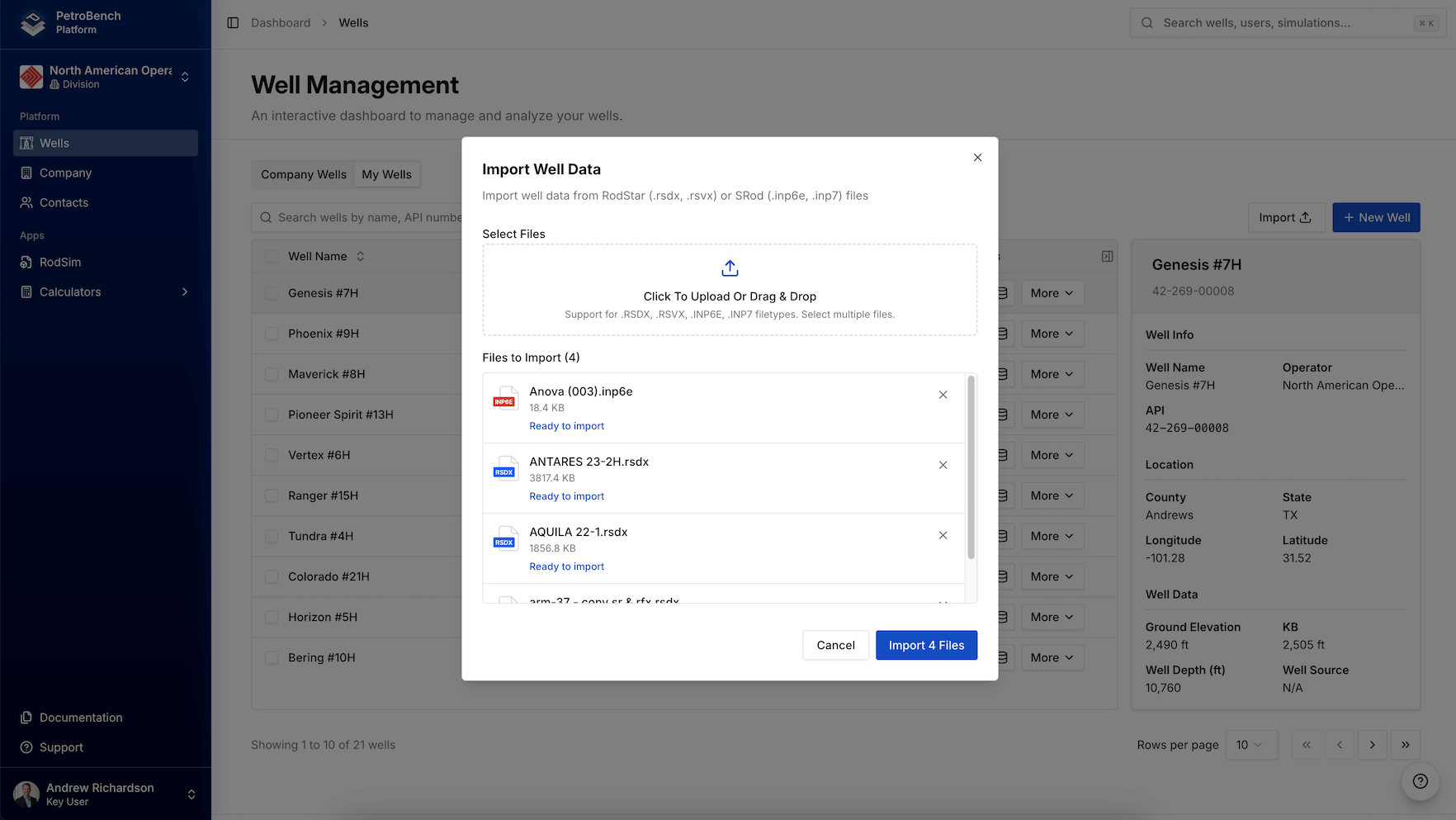
Supported Formats
| Format | Extension |
|---|---|
| RodStar Data | .rsdx |
| RodStar Vendor | .rsvx |
| SRod v6 | .inp6e |
| SRod v7 | .inp7 |
Single Import
- Go to Wells
- Click Import
- Select a simulation file
- Review validation results
- Click Import
Bulk Import
Bulk import is available on SME and Enterprise plans.
- Go to Wells
- Click Import
- Select multiple files (Ctrl/Cmd + click)
- Review validation for each file
- Remove any failed files (click X)
- Click Import X Files
Validation Status
- Spinner - Validating
- Green check - Ready to import
- Red X - Failed validation
What Gets Imported
- Well name, API number, location
- Pumping unit and rod string
- Tubing and pump data
- Simulation parameters
Files are processed and discarded after import. Keep your source files as backups.
Limits
- 10 files per bulk import
- 50 MB per file
Troubleshooting
Invalid file type
Invalid file type
Verify the file has a supported extension and was exported correctly from RodStar or SRod.
Well already exists
Well already exists
A well with the same API number exists. Delete it first or modify the API in the source file.
File too large
File too large
Maximum file size is 50 MB.